Feature-Based Folder Structure for Frontend Apps
· 2 min read · #folder-structure #react #scalability
On this page
Most React projects start like this:
src/
  components/
  hooks/
  services/
  utils/
It works for ten files. At two hundred, adding a "cart" change means opening five folders, and nobody knows which hook is safe to delete. The structure tells you what a file is, but not what it is for.
Group by feature
A feature-based structure groups code by what it does for the user:
src/
  app/                 # routes and pages
  features/
    auth/
      components/
      hooks/
      api/
      index.ts         # public API
    cart/
    blog/
  shared/
    ui/                # Button, Input, Modal
    lib/               # fetch wrapper, formatters
    hooks/             # useDebounce, useMediaQuery
Everything about the cart lives in features/cart. Deleting the feature means deleting one folder.
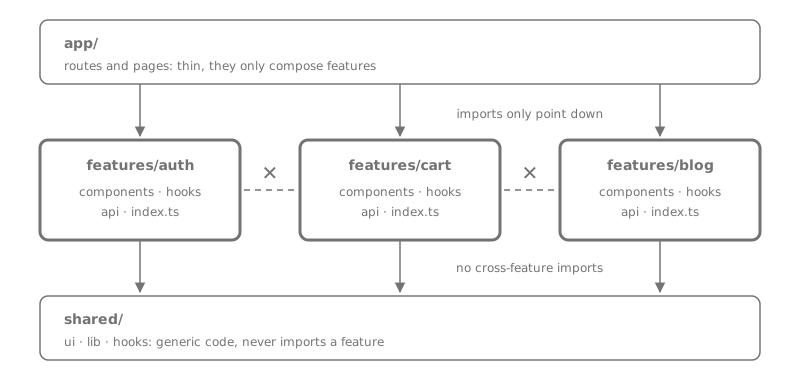
Three rules that make it work
The folders alone are not the point. The rules about imports are.
1. Imports only point down
app/can import fromfeatures/andshared/.features/can import fromshared/.shared/imports nothing from the layers above.
If shared/ui/Button imports something from features/auth, it is not shared anymore.
2. Every feature has a public API
Each feature exports only what others are allowed to use, through its index.ts:
export { CartButton } from "./components/CartButton";
export { useCart } from "./hooks/useCart";
// CartItemRow, cartReducer, api/* stay private
Other code imports from the feature, never from its internals:
import { CartButton } from "@/features/cart"; // good
import { CartItemRow } from "@/features/cart/components/CartItemRow"; // avoid
Now you can rename or rewrite anything inside cart/ without breaking the rest of the app.
3. Features do not import each other's internals
When checkout needs data from cart, it uses cart's public API. If two features keep needing each other's internals, that is a sign the shared piece should move down into shared/, or the two features are really one.
Let a linter enforce it
Rules that only live in people's heads get broken. ESLint's built-in no-restricted-imports can block deep imports:
{
  rules: {
    "no-restricted-imports": ["error", {
      patterns: [{
        group: ["@/features/*/*"],
        message: "Import from the feature's index.ts instead.",
      }],
    }],
  },
}When not to bother
Summary
- Group code by feature, not by file type.
- Imports flow down:
app→features→shared. - Each feature exposes a small public API through
index.ts. - Enforce the rules with a linter, not with memory.