Server vs Client Components in the Next.js App Router
· 3 min read · #app-router #react-server-components #performance
On this page
In the App Router, every component is a Server Component by default. It runs on the server, and only its HTML output reaches the browser. Its JavaScript never does.
A Client Component is the familiar React component: it is rendered on the server for the first HTML, then its JavaScript is sent to the browser so it can become interactive.
The question is not "which one is better". It is where to draw the line.
Which one to use
Use a Server Component when you need to:
- fetch data or read a database
- use secrets like API keys and tokens
- render with a large library (markdown, syntax highlighting) without shipping it
Use a Client Component when you need:
- state and effects:
useState,useEffect,useRef - event handlers:
onClick,onChange,onSubmit - browser APIs:
window,localStorage,IntersectionObserver
The 'use client' boundary
"use client" does not mark one component. It marks a boundary: the file with the directive, and every module it imports, becomes part of the client bundle.
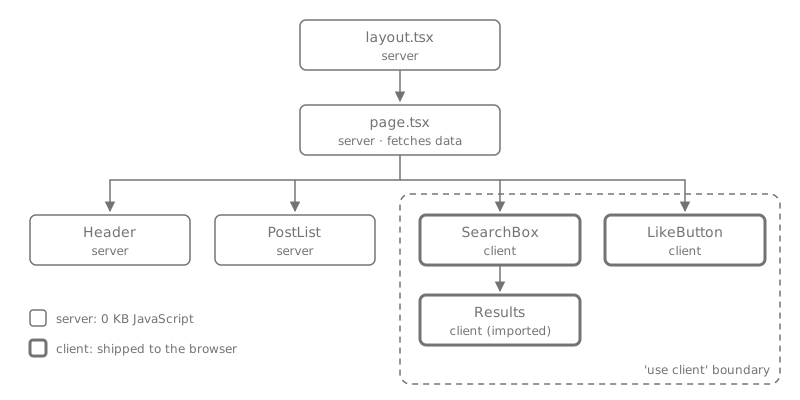
In this tree, Results has no directive of its own, but SearchBox imports it, so it ships to the browser too.
import { getPosts } from "@/lib/posts";
import { PostList } from "./PostList";
import { SearchBox } from "./SearchBox";

// Server Component: async, reads data directly, no client JS.
export default async function BlogPage() {
  const posts = await getPosts();

  return (
    <main>
      <SearchBox />
      <PostList posts={posts} />
    </main>
  );
}"use client";
import { useState } from "react";
export function SearchBox() {
const [query, setQuery] = useState("");
return <input value={query} onChange={(e) => setQuery(e.target.value)} />;
}Push the boundary down
The most common mistake is putting "use client" at the top of a page because one button needs onClick. Now the whole page, and everything it imports, ships as JavaScript.
Instead, keep the page on the server and move only the interactive part into a small client component:
"use client";

export function LikeButton({ postId }: { postId: string }) {
  return <button onClick={() => like(postId)}>Like</button>;
}
The page stays a Server Component and renders <LikeButton postId={post.id} />. Only that one button costs JavaScript.
Server components inside client components
A client component cannot import a server component. But it can receive one as children or any other prop:
<Modal>
  {/* Rendered on the server, passed through the client Modal */}
  <ProductDetails id={id} />
</Modal>
Modal controls opening and closing on the client. ProductDetails is still rendered on the server, with its data fetching and zero client JS.
Props must be serializable
Anything passed from a server component to a client component crosses the network, so it must be serializable: strings, numbers, plain objects, arrays, Date, and promises are fine.
Keep server code on the server
If a module reads secrets or the database, make sure it can never end up in the client bundle by mistake:
import "server-only";

export async function getUser(id: string) {
  // uses process.env.DATABASE_URL
}
If a client component ever imports this file, the build fails instead of leaking server code.
Summary
- Server by default. Add
"use client"only where you need state, effects, events or browser APIs. - The directive marks a boundary: everything imported below it ships to the browser.
- Keep client components small and as deep in the tree as possible.
- Pass server components to client components through
children.