How the JavaScript Event Loop Actually Works
· 3 min read · #event-loop #async #promises
On this page
JavaScript runs on a single thread. It can only do one thing at a time, yet a page can fetch data, run timers and respond to clicks without freezing. The piece that makes this work is the event loop.
Once you understand it, a lot of "weird" async behaviour stops being weird.
A quick quiz
What does this print?
console.log("1");

setTimeout(() => console.log("2"), 0);

Promise.resolve().then(() => console.log("3"));

queueMicrotask(() => console.log("4"));

console.log("5");
The answer is 1 5 3 4 2. The timeout has a delay of 0, but it still runs last. To see why, we need four pieces.
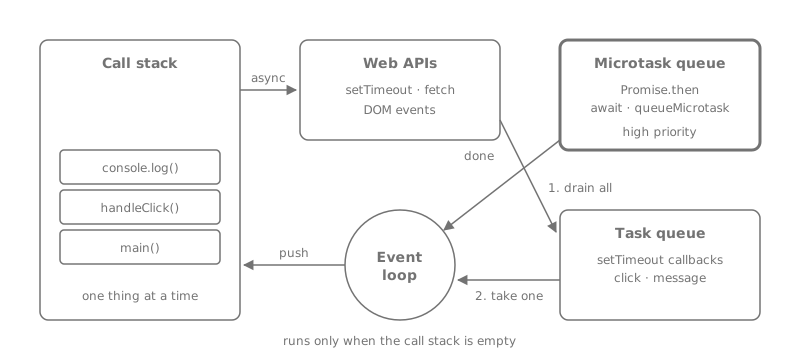
The four pieces
Call stack
The call stack is where your code actually runs. Every function call is pushed on top and popped off when it returns. While the stack is busy, nothing else can run: no clicks, no timers, no rendering.
Web APIs
setTimeout, fetch and DOM events are not part of the JavaScript engine. The browser handles them in the background. When the work is done (the timer fires, the response arrives, the user clicks) the browser puts a callback in a queue.
Task queue
Callbacks from timers and events wait here. These are often called macrotasks. The event loop takes one task at a time.
Microtask queue
Promise callbacks (.then, .catch, .finally), code after an await, and queueMicrotask go here. Microtasks have higher priority: after every task, the event loop runs all microtasks until the queue is empty.
The loop, step by step
- Run the current script until the call stack is empty.
- Run every microtask. If a microtask adds another microtask, run that too.
- The browser may render (style, layout, paint).
- Take one task from the task queue and go back to step 1.
Now the quiz makes sense. 1 and 5 are synchronous. When the stack is empty, both microtasks (3, 4) run. Only then does the loop pick up the timer task (2).
What await really does
await is built on promises, so the code after it is a microtask:
async function load() {
  console.log("A");
  await null;
  console.log("C"); // queued as a microtask
}

load();
console.log("B");
// A, B, C
Everything before the first await runs synchronously. The rest of the function is resumed later, once the current synchronous code has finished.
Blocking the page
Because rendering happens between tasks, long synchronous work freezes the page:
button.addEventListener("click", () => {
  const end = Date.now() + 3000;
  while (Date.now() < end) {} // the page is frozen for 3 seconds
});For heavy work, split it into chunks and give the browser a chance to breathe between them, or move it to a Web Worker:
async function processAll(items) {
  for (let i = 0; i < items.length; i++) {
    process(items[i]);
    if (i % 500 === 0) {
      await new Promise((r) => setTimeout(r, 0)); // yield to the event loop
    }
  }
}
Using setTimeout here matters: it creates a new task, so the browser can render and handle input before the next chunk. Yielding with a resolved promise would only create a microtask and would not help.
Summary
- One call stack, one thing at a time.
- After each task, all microtasks run, then the browser may render.
- Promises and
awaitare microtasks.setTimeoutand events are tasks. - Long synchronous work, or an endless chain of microtasks, blocks rendering.